 Code

IMPLEMENTATION
Jules
Add the theme preference and dark palette. Preserve the existing screens, navigation, and acceptance checks.
YOUR AI DEVELOPMENT STUDIO
Bring an idea, feature, or bug. Your AI crew helps plan the work, make code changes, and present the result for your review in one Windows development studio.
Get launch and access details. No payment or purchase commitment.
Windows desktop · $15.99/month or $129.99/year · USD
Connect your own account for real coding missions.
THE COST OF “I’LL GET TO IT”
There’s always another bug, another deadline, another reason to push your own project back. Make room for the build you keep thinking about.
Be there when CodeFloor opensFROM THE FIRST BRIEF TO THE FINAL CLICK
One real mission, from a missing dark-mode preference to a working feature. Watch the work come together. Then try the result yourself.
LOOK A LITTLE CLOSER
Explore the handoff. Make the final click.
THE REQUEST
“Add a persistent dark-mode preference. Keep both screens and the navigation working. Follow the system theme until I choose.”
A focused change to theme.js and styles.css, with a clear acceptance contract.
02 / THE CREW’S APPROACH
This mission used Jules for implementation and Remy for independent review. Other missions can use different roles; the full roster stays available.
Add the theme preference and dark palette. Preserve the existing screens, navigation, and acceptance checks.

Review the candidate revision and rerun the eight browser scenarios before accepting the change.
Two allowed files. The sample’s screens and test contract stay intact.
Retain the actual file changes and executable verification results.
Independent review accepted the revision. Manual approval then applied it to the sample.
03 / THE HANDOFF
8 of 8 browser scenarios passed, up from 2 of 8 before the change. Independent review accepted the same revision, then manual approval applied it to the sample project.
Reviewed revision 0092a6637e797e88577ec360fd5306602373364b
Two changed files: theme.js and styles.css. The acceptance contract and existing screens stayed unchanged during this run.
Observed checks · npm test ran the fixed eight-scenario browser contract. All eight passed in broker verification, independent review, and a separate rerun after integration.
Excerpt from the actual theme change
+(() => {
+  const key = 'northstar-theme';
+  const system = window.matchMedia('(prefers-color-scheme: dark)');
+  const button = document.querySelector('#theme-toggle');
+  let preference = null;
+
+  try {
+    const saved = localStorage.getItem(key);
+    if (saved === 'dark' || saved === 'light') preference = saved;
+  } catch {
+    // Keep the toggle usable when browser storage is unavailable.
+  }
+
+  function render() {
+    const dark = preference === null ? system.matches : preference === 'dark';
+    document.documentElement.dataset.theme = dark ? 'dark' : 'light';
+    button.setAttribute('aria-pressed', String(dark));
+  }
+
+  button.addEventListener('click', () => {
The theme change also adds a dark palette in the existing CSS variables. Review: accepted by Remy. Integration: manually approved and applied. An earlier attempt was held when Edge could not launch in the command sandbox. The sample runner was configured to use installed Chrome before this fresh run; the eight behavioral scenarios and assertions were preserved.
04 / TRY THE RESULT
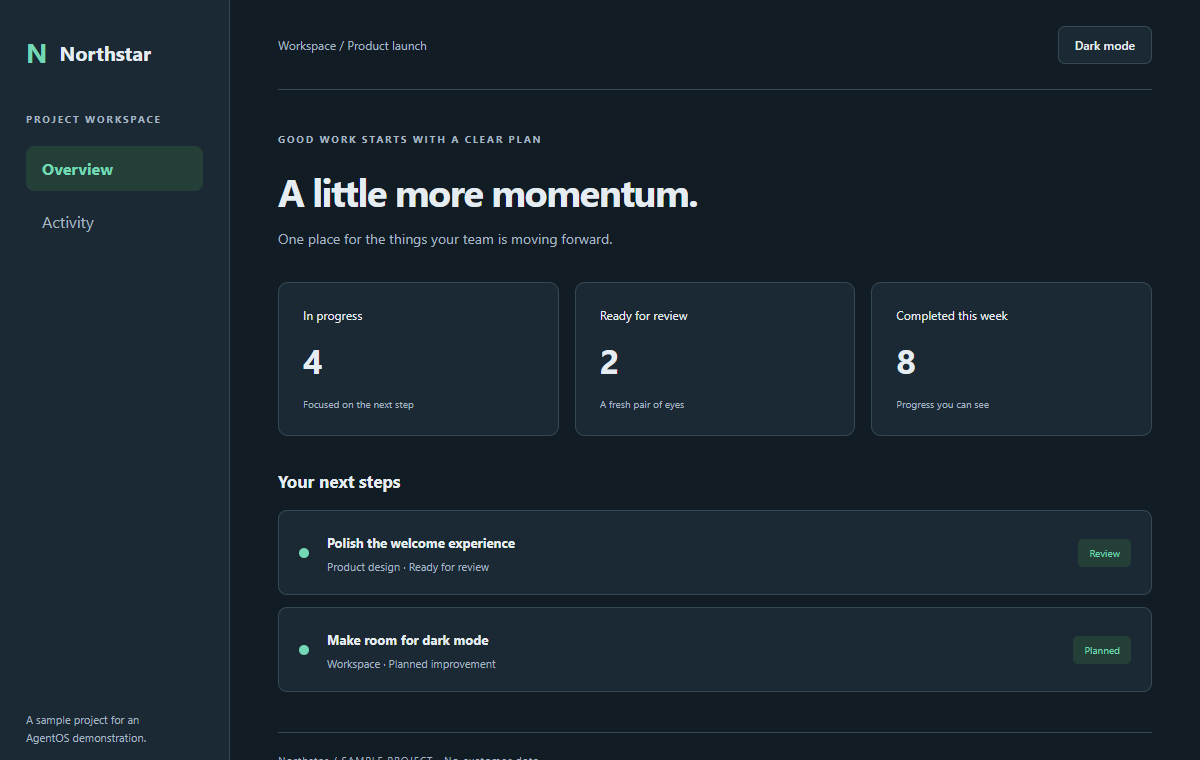
Switch the theme. Visit Activity. Reload the sample. The preference stays with you.
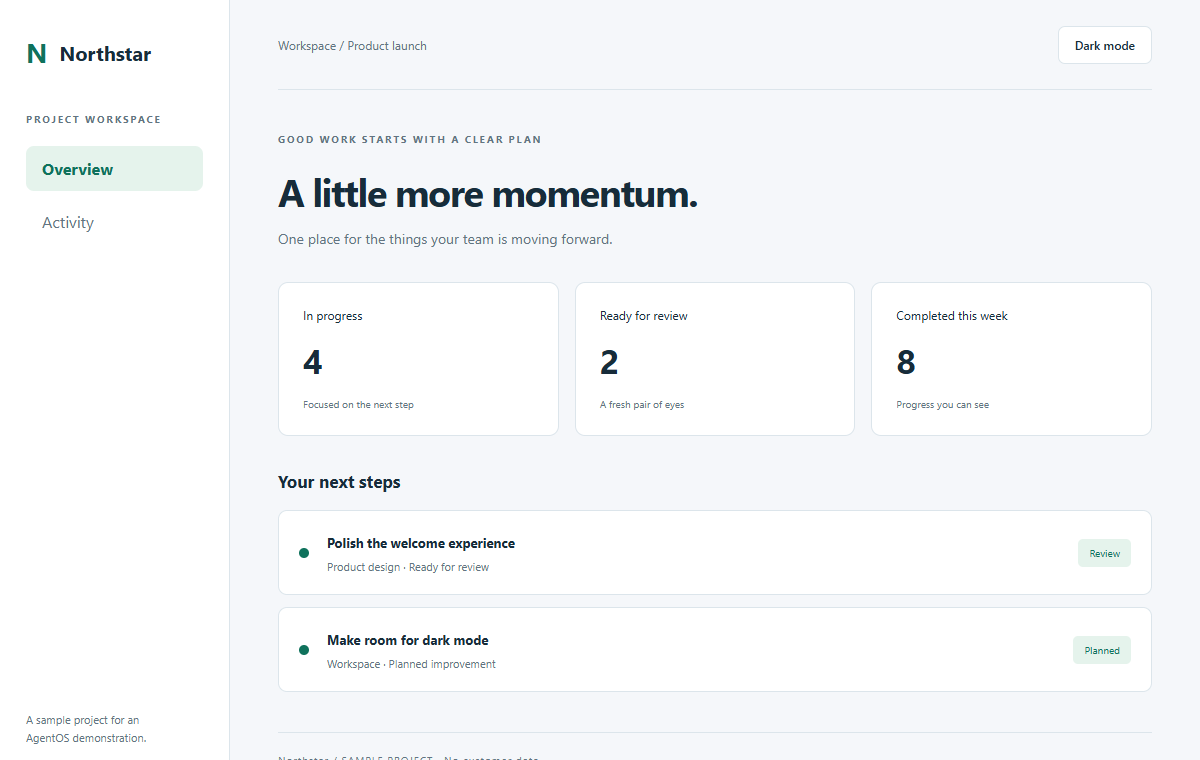
The original sample · the theme preference is missing.
Sample project · presentation adapted for this demo. The reviewed theme and application code are unchanged.
Jules ImplementationRemy Review00:00 — One choice. A workspace that remembers you. A full-screen light-to-dark reveal introduces the real Northstar sample. One request produces a working feature.
00:08 — A clear finish line. A close-up of the actual desktop brief shows the two allowed files, theme.js and styles.css, and the preserved screens and browser contract.
00:13 — A focused change. A fresh pair of eyes. Jules implemented the change; Remy reviewed it independently. The office image behind these role cards is illustrative product footage.
00:18 — The actual change. Close-ups of the reviewed theme.js show reading the saved preference, following the system until an explicit choice, and persisting that choice.
00:25 — The result has receipts. All eight recorded browser scenarios passed, up from two before the change. The actual desktop evidence shows accepted independent review. Manual approval applied the same revision, followed by a separate passing rerun.
00:33 — Choose. Navigate. Reload. Fresh browser footage of the unchanged applied app shows dark mode being selected, navigation to Activity, a reload retaining the preference, and a return to Overview. The camera and cursor highlights guide attention to the actual controls.
00:45 — From your idea. To your next step. Explore the evidence and try the finished feature below. This 50-second HD edit includes original instrumental music and synchronized sound effects, with no speech. All explanatory content is visible on screen and available here. A sample result does not guarantee the outcome or duration of another mission.
Imagine this handoff for your next build.
A clear goal. Work you can review. Your final decision.
A NEXT STEP FOR YOUR KIND OF WORK
An existing codebase, an early idea, or a team backlog. Start with one result and a scope you can judge.
Fix the recurring bug. Add the next feature. Keep your attention on the decisions that need you.
Scoped changes with evidence to inspect.Shape an early product idea into a technical plan and a bounded first feature, with setup and review support where needed.
A concrete starting point for your product.Give a defined backlog task a clear brief. Follow specialist work, checks, and review in the same workspace.
A handoff your team can assess.“Add a beautiful dark mode to my app. Match the existing design, remember the preference, and check that the key screens still work.”
CHECKS, REVIEW, AND YOUR APPROVAL
Define success and review the approach. Follow implementation, observed checks, and independent review before deciding what enters your project.
Pick your project and describe what a good result looks like.
Set the scope and acceptance checks before authorizing implementation. Ask for a planning mission first if you want a separate plan to approve.
Follow implementation, verification, and review in one place.
Inspect the result and approve what goes into your project.
Manual review runs verification and independent review before you approve integration. Automatic checked applies changes after those gates pass; Fast can apply unchecked work. Choose the delivery mode deliberately. CodeFloor does not commit, push, or publish changes for you.
A WORKSPACE THAT CONNECTS THE WORK
Keep project conversations, specialist work, and retained knowledge together. Explore the studio behind the workflow. Office scenes show the visual experience; the mission above shows an actual result.
Six available specialists. Missions use the roles they need; simple work can take a smaller path.


Bring the feature, bug, or side project. Your crew helps shape the scope, surface trade-offs, and turn the conversation into a mission you can review.
 The team table Installed app snapshot
Keep useful decisions, project notes, and lessons close. Give the next mission relevant context from the work that came before it, so you spend less time setting the scene.
 The Brain archive Installed app snapshot
A STUDIO FOR THE WORK AHEAD
Your CodeFloor subscription covers the studio and its orchestration features. Both plans include the same six-specialist roster. Select an optional preference when you join the launch list.
The complete studio, billed month by month.
$15.99/ month
Billed monthly.
Join early access · monthlyThe same full studio, with a lower yearly cost.
$129.99/ year
Billed yearly. Equivalent to $10.83/month.
Join early access · yearlyKeep $61.89 for your next big idea, every year.
Connect your own eligible Codex account for real coding missions. Codex access and usage limits are managed separately by OpenAI.
Prices in USD. Both plans include the same CodeFloor features.
Join early access for availability details. No payment is collected today.
BEFORE YOU JOIN
A few things to know about your future studio.
Codex performs the coding work. CodeFloor brings the surrounding workflow into a visual studio: project conversations, scoped missions, specialist coordination, retained context, observed checks, and review. You connect your own eligible Codex account; CodeFloor is a separate product.
You can bring an idea and work through a technical plan with the crew. Real coding missions still require a Windows computer, Git, a local repository, and a compatible signed-in Codex CLI. You may need technical help with setup, choosing acceptance checks, and reviewing the resulting code. Start with a bounded first feature and arrange the oversight your project needs.
CodeFloor is a desktop development studio built around six AI specialists in a living pixel-art office. It brings project conversations, planning, real coding missions, verification, review, and retained project knowledge into one workspace.
Yes. Real missions use Codex to work with a local Git repository in a private workspace. CodeFloor can retain the resulting changes, command evidence, checks, and reviews so you can inspect the work before integration. The office also includes a simulation mode for exploring the experience.
Your CodeFloor plan covers the studio and its orchestration features. Connect your own eligible Codex account for real coding missions. Codex access, usage limits, and any provider charges are managed separately by OpenAI. CodeFloor is an independent product and is not affiliated with, sponsored by, or endorsed by OpenAI.
The current desktop build is for 64-bit Windows. Real coding missions require Git, a local repository, and a compatible installed Codex CLI signed in with an eligible ChatGPT account. Optional local AI discussions require a one-time model setup. We’ll share onboarding details with early access.
The studio, its saved state, and project workspaces live on your computer. Optional local-model conversations can run offline after setup. Codex coding missions connect to OpenAI and require internet access; they are not offline inference.
You choose the project, authorize missions, and set the boundaries for ongoing work. Manual review supports verification, independent review, and your integration approval. Automatic checked applies after those gates pass; Fast can apply unchecked work. Automatic modes must be enabled deliberately. CodeFloor does not commit, push, or publish your changes for you.
CodeFloor is $15.99 per month or $129.99 per year (USD). The yearly plan saves $61.89 compared with twelve monthly payments. Join the early-access list to hear about availability and access details. Joining does not require payment or commit you to a purchase.
YOUR NEXT STEP STARTS HERE
Join the early-access list for launch news, availability, and access details. Leave your email, choose a plan preference if you like, and decide whether CodeFloor fits when access opens.